Sales This Period
Commission Earned
Pending Payout
Orders
Link Clicks
Conversion Rate
| Order | Date | Sale Amount | Your Commission | Status |
|---|
Current Earning Period
ActiveUpcoming Payout Schedule
Target business owners
ProductiveBot is built for SMB owners who value privacy and efficiency — perfect for your business network.
Social content converts
Short demos showing TotalRecall or the Skill Store tend to drive high engagement. Check Brand Assets for approved copy.
Leverage your network
A personal recommendation from you is worth more than any ad. Genuine stories about AI for business resonate strongly.
Scale to Elite tier
16+ sales per month earns you $150 per sale — that is $2,400+ in a single month at the Elite level.
Partner Training
Everything you need to start promoting ProductiveBot confidently and effectively.
-
Join the Partner ProgramYou're in. Welcome to the ProductiveBot partner community.
-
Complete your payout onboardingAdd your PayPal email, accept the affiliate terms, and upload your W-9 PDF.
-
Download the Partner KitGet your logos, brand guide & AI content prompts. Required before promoting.
-
Watch the product walkthrough videosGet familiar with features so you can answer questions with confidence.
-
Share your first postShare a post promoting ProductiveBot and paste the link below — we’ll reshare it to help you get more exposure.
-
Make your first saleShare your referral link and earn $100+ per sale. Need help closing a deal? Contact us →
ProductiveBot Overview
A full walkthrough of what ProductiveBot is and what makes it different from cloud AI tools.
TotalRecall Demo
See how persistent memory works in action — a powerful feature that sells itself.
Skill Store Walkthrough
Explore how skills expand what ProductiveBot can do — scheduling, research, coding, and more.
Security & Privacy
Why ProductiveBot is the safest AI solution for business owners — on-device processing, data ownership, and compliance.
Token Cost Management
How to manage AI usage costs, choose the right model for each task, and avoid surprise bills.
Sales Objections Handled
How to respond to common pushback: "Why not just use ChatGPT?" and more.
Dedicated Hardware
Runs on a Mac mini that lives in your office — not a distant server. No internet outages = no disruption.
Multi-AI Provider Support
Not locked to one AI. Switch between Claude, GPT, Gemini, and more — or run local models entirely offline.
TotalRecall Memory
Your AI remembers everything. Projects, preferences, context from months ago — always available.
Skill Store Marketplace
One-click skills that expand capability: email, calendar, research, coding, image gen, and more.
Privacy-First
All files, memory, and data stay on the device. Nothing is sent to ProductiveBot's servers.
Best-in-Class Support
Scout AI handles instant questions; human team is available for setup, troubleshooting, and onboarding.
Use these as starting points — adapt them to your own voice.
Brand Assets
Official logos, images, and copy approved for partner use. Always use these — don't create your own variations.
[YOUR LINK] with your personal referral link from the Dashboard.
Social Banners
1200x630, 1080x1080 sizes
Brand Colors
Primary Dark
Cyan Accent
Card BG
Heading
Body Text
Typography
Headings: Inter, bold (700-800 weight).
Body: Inter, regular weight. Comfortable line-height.
Tone: Professional but approachable. Clear over clever. Plain English.
Tone of Voice
- — Direct — say what it does, skip the hype
- — Confident — we're proud of the product
- — Human — not corporate jargon
- — Business-focused — speak to ROI and practicality
- — Privacy-forward — this is a core differentiator
Do
- Use the official logo files provided
- Use approved copy templates as a base
- Disclose that you're an affiliate partner
- Link to productivebot.ai using your referral link
- Highlight real features (TotalRecall, Skill Store, privacy)
- Focus on business owners as your audience
- Contact support if unsure about a promotion
Don't
- Create unofficial logos or alter brand colors
- Make unsubstantiated performance claims
- Promise discounts or pricing not listed on the site
- Spam communities, DMs, or comment sections
- Impersonate ProductiveBot as an official rep
- Use ProductiveBot in paid ads without approval
- Bid on "ProductiveBot" branded keywords in PPC
Commission Tiers
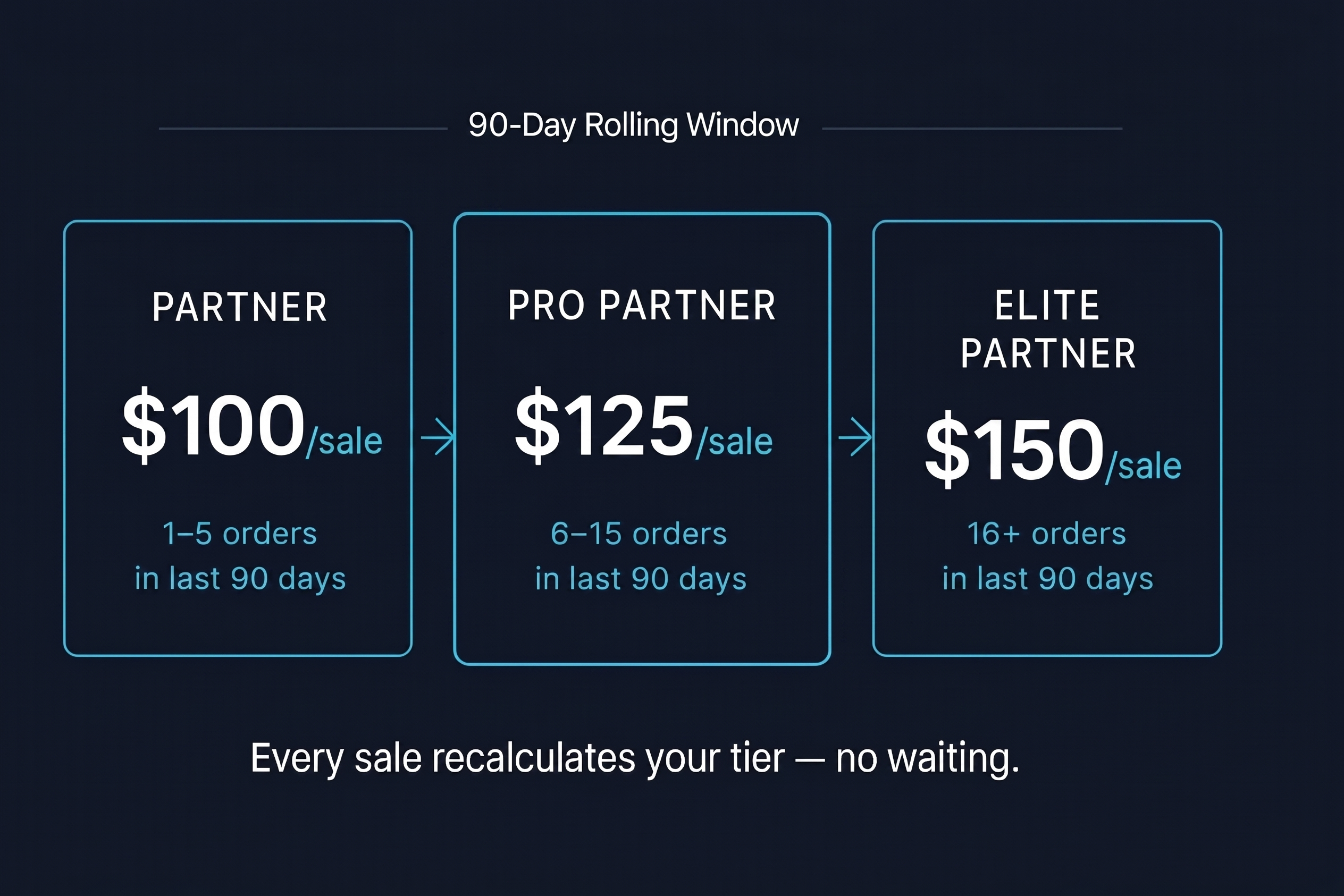
Earn more as you grow. All tiers pay per confirmed sale — no caps, no waiting periods.
Your tier is recalculated on every sale — not monthly. At the moment you earn a commission, the system counts your confirmed orders from the last 90 days and applies the matching rate to that sale.
in last 90 days
in last 90 days
in last 90 days
⚡ Hit 6 sales? Your next sale earns $125 automatically — no waiting for a reset. The window moves forward every day.
Build momentum in your 90-day window
Your tier is checked on every sale using your last 90 days of orders. Hit 6+ sales in any rolling 90-day period and you earn at the Pro rate immediately — no waiting.
Use every channel available
Combine social media, email, in-person referrals, and content marketing. The partners who reach Elite use at least 3 channels.
Lean into the product's story
ProductiveBot sells when people understand the privacy angle and the hardware difference. Demo content converts better than text-only posts.
Reach out to our team for co-marketing
Elite-track partners may qualify for co-branded content, early access to new features, and featured placement in our newsletter.
Cookie Duration
30 days from first click. Any purchase within 30 days counts as your referral.
Payout Schedule
Monthly via the PayPal email saved in your partner profile. Payouts are only released after your W-9 has been uploaded and then marked approved/on file by the team, and your balance meets the minimum threshold.
What Counts
Only confirmed, non-refunded sales count. Cancellations and chargebacks are deducted.
Tier Evaluation
Your tier is evaluated on every sale using a rolling 90-day window. Hit a threshold and your rate upgrades on that sale — no waiting for a calendar reset.
Tracking
Tracked via GoAffPro's Shopify integration with first-click attribution. Your unique link and reporting are surfaced here inside the ProductiveBot portal.
Minimum Payout
$50 minimum balance required for payout. Balances roll over month-to-month.
Frequently Asked Questions
Answers to the most common partner questions. Can't find what you need? Reach out to our team.
Partner: 1–5 orders → $100/sale
Pro Partner: 6–15 orders → $125/sale
Elite Partner: 16+ orders → $150/sale
There is no fixed reset date. As orders age out of the 90-day window, your count adjusts. Consistent selling keeps your rate high; a long gap may lower it on your next sale.
Still have questions?
Our team typically responds within one business day. Scout AI is available instantly.